Case Study · Consumer Mobile · iOS
Can I? — a playful way for couples to ask
Can I? turns the small, everyday asks between partners — a kiss, a cuddle, a walk, an uninterrupted game — into a light, game-like exchange. Instead of interrupting or guessing, one partner sends a request into the other's "chest"; the other accepts or gently declines, and both sides always know where things stand.
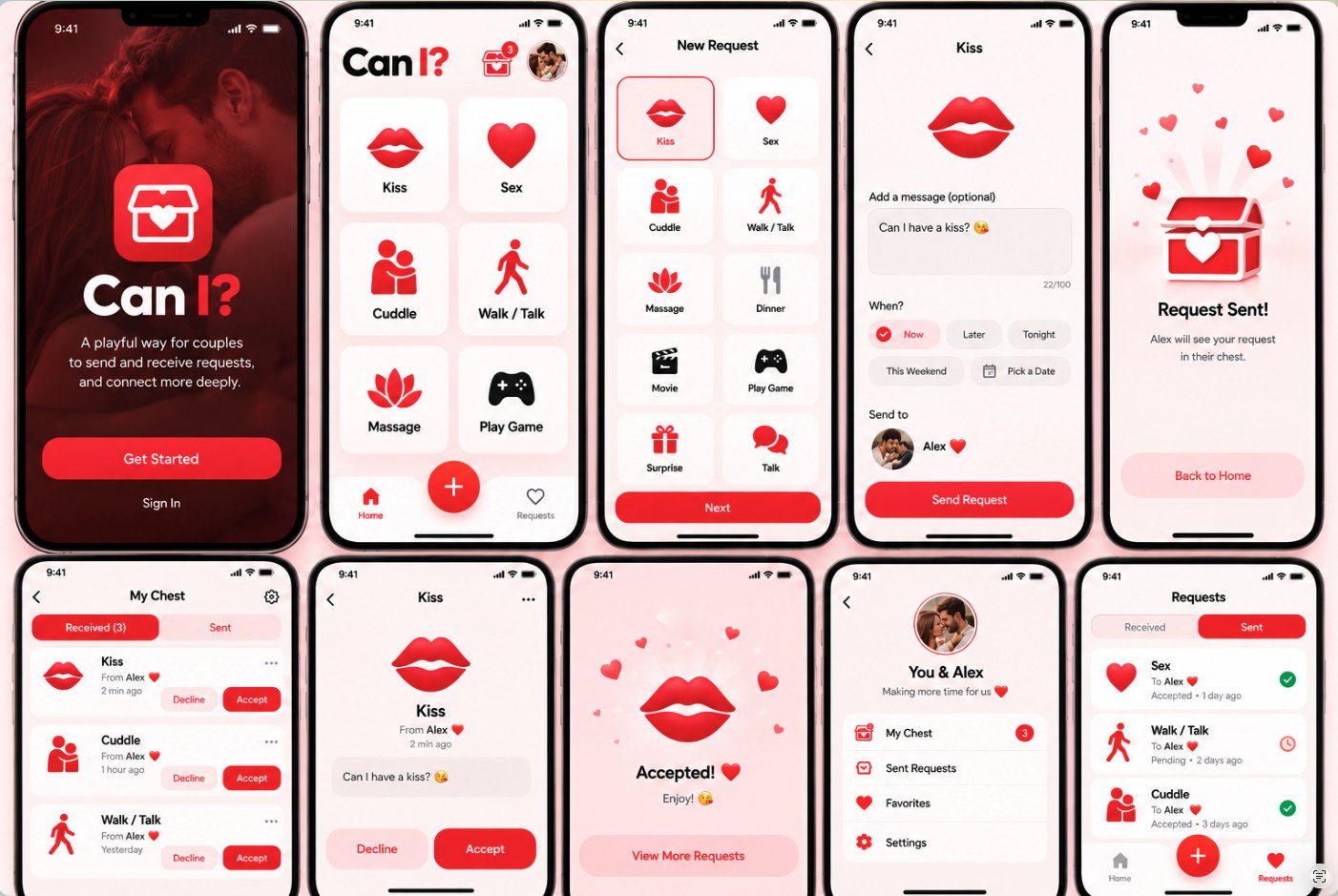
The full screen set. Every phase below explains how the design got here — and the screen-by-screen notes at the end explain what each screen does and why it is designed that way.
1 — The problem
Partners ask each other for affection, time and attention all day — but asking out loud carries friction. It can feel needy, badly timed, or easy to misread; a "not now" heard the wrong way lands like rejection. Couples end up either interrupting each other or not asking at all. The opportunity: give the ask a dedicated, playful channel where sending is effortless, timing is explicit, and saying no stays kind.
Asking feels heavy
A small ask ("can we talk?") can sound like a big conversation. The weight of the wording discourages people from asking at all.
Timing is invisible
"Not now" rarely says when. Without a time attached, the asker can't tell a delay from a dismissal.
No shared record
Verbal asks evaporate. Neither partner can see what's been asked, accepted, or is still waiting — so small promises slip.
2 — Discovery & research
Discovery mapped the existing landscape — couple apps focused on calendars, chores and question games — and the everyday language couples already use in chat (short asks, emojis, "can I…?" phrasing). Three insights drove the concept:
Make it a game, not a demand
Requests framed as play — collected in a treasure "chest" — remove the pressure of a face-to-face ask.
One tap to send
If sending takes more than a few seconds, people revert to texting. The type must be chosen visually, in one tap.
Declining must feel safe
Accept and Decline sit side by side with equal visual weight, and timing chips (Later, Tonight) turn a "no" into a "later".
3 — Who it's for
You & Alex — the busy couple
Together for a few years, both working, evenings split between screens. They don't lack affection — they lack easy moments to ask for it. Goals: ask without interrupting, keep small promises visible, and make the exchange feel fun rather than administrative. The profile screen ("Making more time for us") is written in this voice — the app is a shared space for two, not a social network.
4 — User flows
Two mirrored flows carry the whole product. Everything else — profile, favorites, settings — supports them.
Sending a request
Home → pick a type (or + for all 10) → add an optional message → choose when (Now / Later / Tonight / This Weekend / Pick a Date) → Send → "Request Sent!" confirmation. The sent request appears instantly under Requests → Sent with a Pending status.
Receiving a request
Badge on the chest → My Chest (Received) → tap a request for its detail view, or Accept / Decline inline → Accept opens a celebration screen; Decline quietly removes it. The badge count drops with every decision, so "inbox zero" is always visible progress.
5 — Core concept: the Chest
The organizing metaphor is a treasure chest: requests you receive are gifts waiting to be opened, not tasks in an inbox. It appears as the logo mark, the home-screen icon with its unread badge, the "Request Sent!" illustration, and the My Chest screen itself. Navigation stays deliberately shallow — Home, one persistent + action, Requests — because the product has exactly two jobs.
6 — From wireframes to UI
Structure first
Low-fidelity flows fixed the two journeys and the tab model (Received / Sent) before any styling — the chest and the requests list had to read as the same data from two sides.
Visual language
A single red family carries the whole brand: deep red for the welcome moment, bright red for actions, soft pinks for surfaces. Large rounded cards keep every target one-thumb friendly.
Icon system
Each of the 10 request types gets one bold, monochrome-red pictogram — lips for Kiss, a lotus for Massage, figures for Cuddle — recognizable at a glance, with no reading required.
7 — Design system snapshot
Type cards
Two-column grid, icon over label; the selected card takes a red outline so the choice is never ambiguous.
When chips
Timing is a first-class part of a request, chosen with one tap from five presets including a date picker.
Request rows
One row = one decision: icon, type, partner, time, and Accept / Decline without opening the detail.
8 — The screens, one by one
What each screen shows, and why it is designed that way — following the order of the flow.
Welcome
A dark, romantic full-bleed moment sets the emotional register before any functionality appears. One primary action (Get Started) and a quiet Sign In keep the first decision effortless.
Home
The six most common request types are one tap away — no menu, no search. The chest icon carries the unread count, and the couple's photo anchors the header so the app always feels like it belongs to the two of them.
New Request
The full set of 10 types in the same grid language as Home, so nothing new has to be learned. Selection is a single tap with a clear red outline; Next stays visible at the bottom.
Compose
The chosen type is celebrated at full size. The message is optional and pre-filled ("Can I have a kiss? 😘") so sending takes seconds; the character count (100) keeps asks short and light. Timing chips make "when" explicit.
Request Sent!
Confirmation uses the chest metaphor — your request is now a gift in Alex's chest. The copy says exactly where the request went, removing any "did it send?" doubt.
My Chest — Received
Incoming requests as a decision list: Accept or Decline inline, newest first, with relative times ("2 min ago") that create gentle urgency without pressure.
Request Detail
Tapping a request opens its full message with the type icon at celebration size. The two actions are equal in size and always visible — deciding is the whole point of the screen.
Accepted!
Accepting is rewarded with a celebration moment ("Enjoy! 🥳") surrounded by floating hearts — the emotional payoff of the loop — before returning to the remaining requests.
Requests — Sent
Your outgoing asks with honest statuses — Accepted with a green check, Pending with a clock — so nothing you asked for ever disappears into silence.
Profile — You & Alex
The couple, not the individual, is the account. Shortcuts lead back to the Chest (with its live count), Sent Requests, Favorites and Settings — everything else stays out of the way.
9 — Tone & micro-interactions
Copy does the emotional work: asks are phrased as questions ("Can I have a kiss?"), confirmations are warm ("Enjoy! 🥳"), and nothing in the product scolds or scores. Hearts float on the celebration and confirmation screens, the badge quietly counts down as requests are answered, and a decline simply clears the request — no guilt copy, no streaks to break.
10 — Prototype & next steps
The design is validated as a fully clickable prototype: the send flow, the chest, accept/decline decisions and the live badge all work end to end. Try it here.
Custom requests
Let couples add their own request types and icons beyond the starter set of 10.
Gentle reminders
A soft nudge when a request sits Pending too long — timed to the "when" the sender chose.
Richer timing
Calendar-aware suggestions ("This Weekend" becomes a real plan) and a watch companion for one-tap replies.